



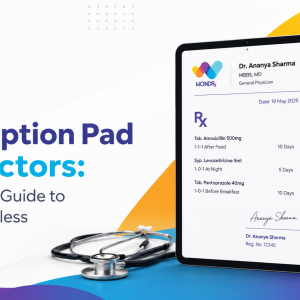
A digital prescription solution can digitize prescription records without requiring doctors to change their existing prescription-writing process. Traditional digital prescription systems often require doctors to enter medication details manually through computers, tablets, or software interfaces. This can add additional steps to consultations and require changes to established clinical workflows.
Handwritten prescriptions remain an integral part of many clinical practices. Doctors can document prescriptions quickly using pen and paper without navigating digital interfaces or manually selecting medication details from software. Replacing this process with digital data entry can introduce additional workflow requirements during patient consultations.
WONDRx Smart Rx enables prescription digitization while maintaining the existing pen-and-paper workflow. Doctors continue writing prescriptions by hand as usual, while the system captures the handwritten prescription and converts it into a structured digital medical prescription. The approach enables healthcare providers to digitize prescription information without requiring doctors to change their established writing process or manually enter prescription details into a digital system.
What Is a Digital Prescription Solution?
At its core, a digital prescription solution is any system that converts prescription information into an electronic format that can be stored, retrieved, shared, or integrated with other healthcare systems. That's a broad definition, and it covers a lot of very different products.
Most digital prescription software on the market today asks the doctor to create the prescription directly on a screen. They open an app or portal, search for the patient's name, select medications from a list, adjust dosages, and hit save. The prescription is digital from the moment it's created, which sounds efficient on paper (pun intended), but it fundamentally changes how the doctor works during a consultation.
There's an important distinction worth making here: creating a prescription digitally is not the same thing as digitizing a handwritten prescription. The first requires the doctor to change their input method entirely. The second lets the doctor keep writing by hand and moves the digitization step to happen automatically, after the fact.
This distinction matters more than it might seem. Workflow compatibility is often the single biggest factor in whether a clinic actually adopts new technology or quietly abandons it after a few frustrated weeks. A solution that respects the doctor's existing process has a much better chance of being used consistently, which is the only way any digitization effort delivers real value.
Why Changing the Doctor's Existing Workflow Can Be a Challenge
It's easy to assume that doctors resist digital tools simply because they're unfamiliar with technology. In practice, the resistance usually comes down to something more specific: time, habit, and the cognitive load of context-switching.
Doctors are accustomed to handwritten prescriptions. For many practitioners, especially those with years of experience, writing a prescription by hand is a fast, almost automatic action. It doesn't require conscious thought about where a button is or which menu a drug is filed under.
Time pressure during consultations is real and constant. In high-volume clinics and hospital OPDs, doctors may see a patient every five to ten minutes. Any workflow change that adds even thirty seconds per patient compounds into a significant loss of time and consultation quality across a full day.
Learning and adapting to new software takes time that most clinical schedules simply don't allow for. Even well-designed interfaces have a learning curve, and doctors are rarely given dedicated training hours to master a new system while patient volumes stay the same.
Disruption to established consultation habits can also affect the doctor-patient relationship itself. Typing on a screen while a patient describes symptoms changes the dynamic of the conversation in ways that writing on paper generally doesn't.
The underlying lesson here is straightforward: technology adoption in clinical settings works best when it fits into existing workflows rather than asking healthcare professionals to reshape their entire process around a new tool. This is precisely the problem a workflow-friendly digital prescription solution is meant to solve.
How WONDRx Digitizes Prescriptions Without Changing the Workflow
WONDRx was built around a simple premise: don't ask the doctor to change anything about how they write prescriptions. Instead, let them continue writing by hand, and handle the digitization separately.
The process looks like this:
Doctor writes → Smart Rx captures → Prescription is digitized → Digital record is created → Data connects with existing systems
Here's what that means in practice:
- The doctor continues writing the prescription with a pen on paper, exactly as they always have.
- There's no need to manually type the prescription into any system.
- WONDRx's Smart Rx captures the handwritten prescription as part of the existing process.
- That handwritten information is then converted into a digital format.
- A structured digital record is generated, ready to be stored, retrieved, or shared as needed.
- The doctor never has to break from their normal consultation flow to make any of this happen.
The result is a digital medical prescription that exists alongside the paper original, without the doctor having to do anything differently during the patient visit. From the doctor's point of view, nothing about their day changes. From the clinic's point of view, prescriptions are now digitized, searchable, and ready to plug into broader digital health infrastructure.
How the WONDRx Smart Rx Workflow Works
Breaking the process down into individual steps makes it easier to see exactly where the digitization happens and why it doesn't interrupt the doctor's routine.
Step 1: Doctor Writes the Prescription
The consultation proceeds as it normally would. The doctor examines the patient, decides on the appropriate medication and dosage, and writes the prescription by hand on paper, just as they would with a conventional prescription pad.
Step 2: Smart Rx Captures the Prescription
Once the prescription is written, WONDRx's Smart Rx system captures the handwritten content. This step happens without requiring the doctor to pause the consultation or perform any additional manual action beyond what they'd normally do.
Step 3: Handwritten Information Becomes Digital
This is where prescription digitization takes place. The captured handwritten content is processed and converted into a usable digital record, translating what was written on paper into structured, searchable data.
Step 4: Digital Prescription Record Is Created
Once digitized, the information is compiled into a formal digital prescription record. This record can include patient details, medications prescribed, dosage instructions, and other relevant clinical information, all stored in a format that's easy to retrieve later.
Step 5: Digital Data Can Connect With Healthcare Systems
The digitized prescription data doesn't have to sit in isolation. It can support existing digital workflows, whether that means integrating with a clinic's records system, supporting pharmacy coordination, or feeding into broader hospital data infrastructure, depending on what the clinic or hospital already has in place.
Key Features of a Digital Prescription Solution Like WONDRx
A workflow-friendly digital prescription solution needs to deliver on a specific set of capabilities to be genuinely useful in a clinical setting. For WONDRx, that includes:
- Handwritten prescription digitization that converts paper prescriptions into digital records
- Pen-and-paper compatibility, meaning doctors don't have to change their writing habits
- Automatic capture of the handwritten prescription as part of the existing process
- Digital prescription records that are structured and easy to retrieve
- Prescription data accessibility for authorized staff, patients, or connected systems
- Integration with existing healthcare systems, allowing digitized data to support broader digital infrastructure
- Workflow-friendly design that minimizes disruption to daily clinical routines
- Secure handling of prescription information, respecting patient privacy and data protection standards
These features work together to bridge the gap between how prescriptions have traditionally been written and how healthcare systems increasingly need that information to exist: digital, structured, and accessible.